I recently completed the Elite upgrade for my Onefinity Woodworker. The upgrade went pretty smooth and PwnCNC was able to help me work through some minor upgrades to my PwnCNC VFD in order to support the Masso controller.
Now that I am up and running, I would like to consider providing some additional feedback to the Masso for both the VFD and also my CW3000 spindle cooler.
I use the IOT relay connected to the VFD to automatically start/stop the CW3000 when the spindle is running.
It looks to be fairly straight forward to connect the CW3000 alarm output plug back to the Masso on one of the spare inputs and configure it to “Spindle Coolant Flow Alarm”.
I am less certain on how to provide feedback from the VFD back to the Masso to ensure the spindle is running and not faulted. The Masso has inputs that can be configured to monitor for spindle alarms. I noticed that the v5 PwnCNC enclosure features list a run state output but I believe this is only being used for the ATC.
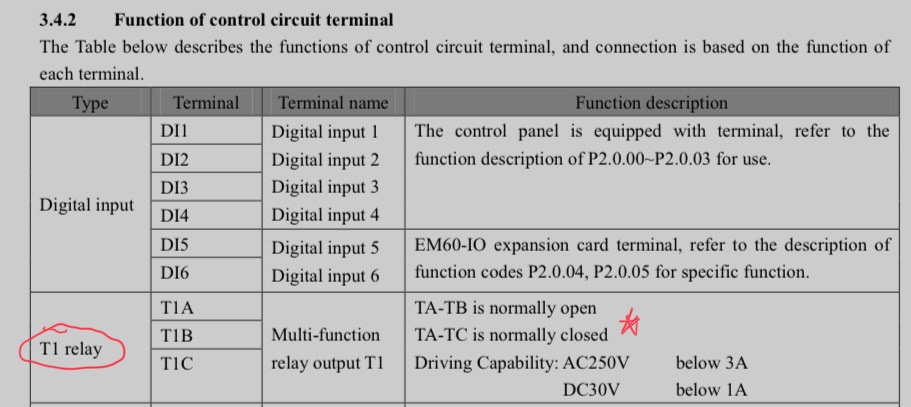
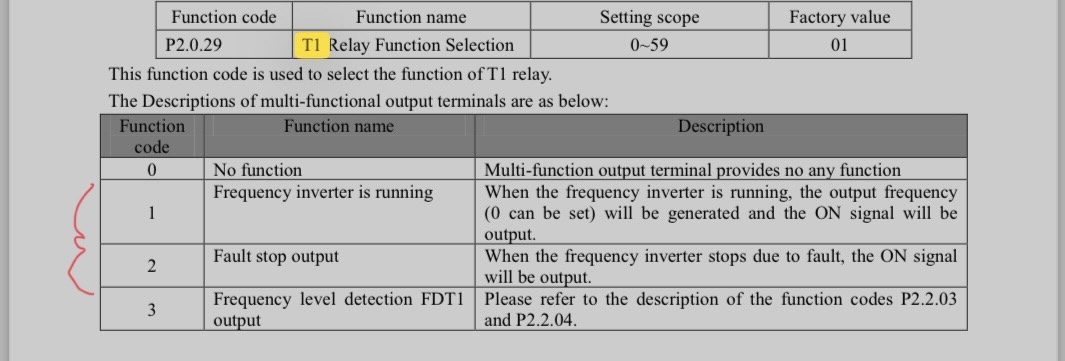
From looking through the VFD manual it looks like the T1 output relay can be used along with an appropriate configuration of parameter P2.0.29. Any details on how this could be configured and wired back to the Masso?
At present the 6 pin cable between the Masso and VFD is only using 4 pins, so I might be able to take advantage of the extra wires.
I’d recommend looking at the AI functionality in the Masso Forum.
I feel like on the Masso side I have the info needed to wire and configure the inputs. I am hoping to get some suggestions / confirmation on the Run status or fault status configuration and wiring from the VFD.
From the manual, it looks like I could use the T1 relay (either normally open or normally closed contacts) and configure parameter P2.0.29 to either running status (01) or fault status (02).
I suppose with some testing I should be able to figure this out, however I was hoping that maybe someone else has already done something similar.
Is it fair to say that the Masso with the default wiring to VFD would not really know if the drive stopped, faulted, or was not even powered up?
Thanks.
I would say yes, masso won’t know with the default wiring if the spindle is running or powered on. However unless it’s a frag-il-ee (cause it’s French) bit it will know when the z does down but isn’t able to go down enough, and you’re right, the run port is for atc, specifically it’s the mtc enable port.
The T1 relay is now exposed in our latest version of the VFD Enclosure… v5.
We’ve labeled it “RUN” on the outside. It’s hooked up to T1A and T1C… it’ll be “normally closed” when not running… and open when it is running.
We’re using this with the ATC’s MTC button functionality for safety… but if you don’t have an ATC… there’s no reason why you couldn’t run it directly into an input of the Masso.
Specifically 1 wire would come from the PWR line of the masso, through the RUN port… in either wire… and out the other wire then into a masso input. Just be sure to add a 5k1 resistor ahead of the input to protect your masso.
Then in the masso setup screen, you can assign that input as needed.
Thanks for the detailed response. Are you keeping the default parameter setting (01) for P2.0.29 for the configuration of the T1 relay?
Yup exactly. We do pull it up during programming to make sure P2.0.29 is set to 01, but that is the default.
Or disconnect the orange wire inside the VFD, jump the +10v terminal to one side of the relay, and connect the orange wire to the other side. Now the orange wire inside Masso is run status.
Looks like I have to open the VFD again. 